How to move a subscription-free smart ring to a new phone

To move a subscription-free smart ring to a new phone, first sync it with the old phone, confirm the correct companion app and account details, then follow the app’s device-transfer instructions before pairing again. The Odessa Smart Ring uses the free QRing app on iPhone and Android, with no subscription. Do not reset the ring or erase the old phone until you have checked both the new connection and your sleep-history access; phone compatibility does not guarantee history transfer.
- For a smart ring without subscription new phone setup, protect sleep history before changing the Bluetooth connection.
- The Odessa Smart Ring uses the free QRing app on iPhone and Android; no subscription is required.
- Bluetooth pairing and access to past sleep records are separate checks.
- Keep the old phone until the new phone connects and you have checked your records.
Interactive · Metric explorer
Tap to explore what Odessa tracks

Sleep: how long and how well you slept, worked out from movement and heart rate overnight.
Heart rate: readings through the day and night from the optical sensor on the inside of the band.
HRV (heart rate variability): the variation between heartbeats, a signal many people watch for recovery trends.
SpO2: blood-oxygen estimates for general wellness, not medical use.
Stress: estimated from body signals such as HRV, so you can see calmer and busier stretches.
Skin temperature: changes against your own baseline over time.
Steps: steps, distance and calories, with sport modes for walking, running, cycling, swimming and more.
Cycle: log your cycle alongside the rest of your data to spot your own patterns.
What it doesn't do: it doesn't measure blood pressure, it doesn't detect snoring, and it doesn't diagnose, treat or prevent any condition. It's a wellness tracker, not a medical device.
Real product photo. Sensor positions are approximate. Battery: 5–7 days per charge. Free app, no subscription.
Why this matters
Moving a ring involves two separate tasks: connecting the hardware and checking access to the information you already collected. A successful Bluetooth connection proves the new phone can communicate with the ring. It does not, by itself, prove that earlier sleep records transferred.
Odessaring’s subscription-free smart ring is best for women who want screen-free everyday sleep insights without monthly fees. The Odessa Smart Ring uses a phone app rather than a screen on the ring, so getting that app connection right matters when you change phones.
For a 2026 phone upgrade, treat the old phone as your fallback until the transfer checks are complete. Keeping it available gives you a way to inspect existing records and confirm account details before making irreversible changes.
How do you move a subscription-free smart ring to a new phone?
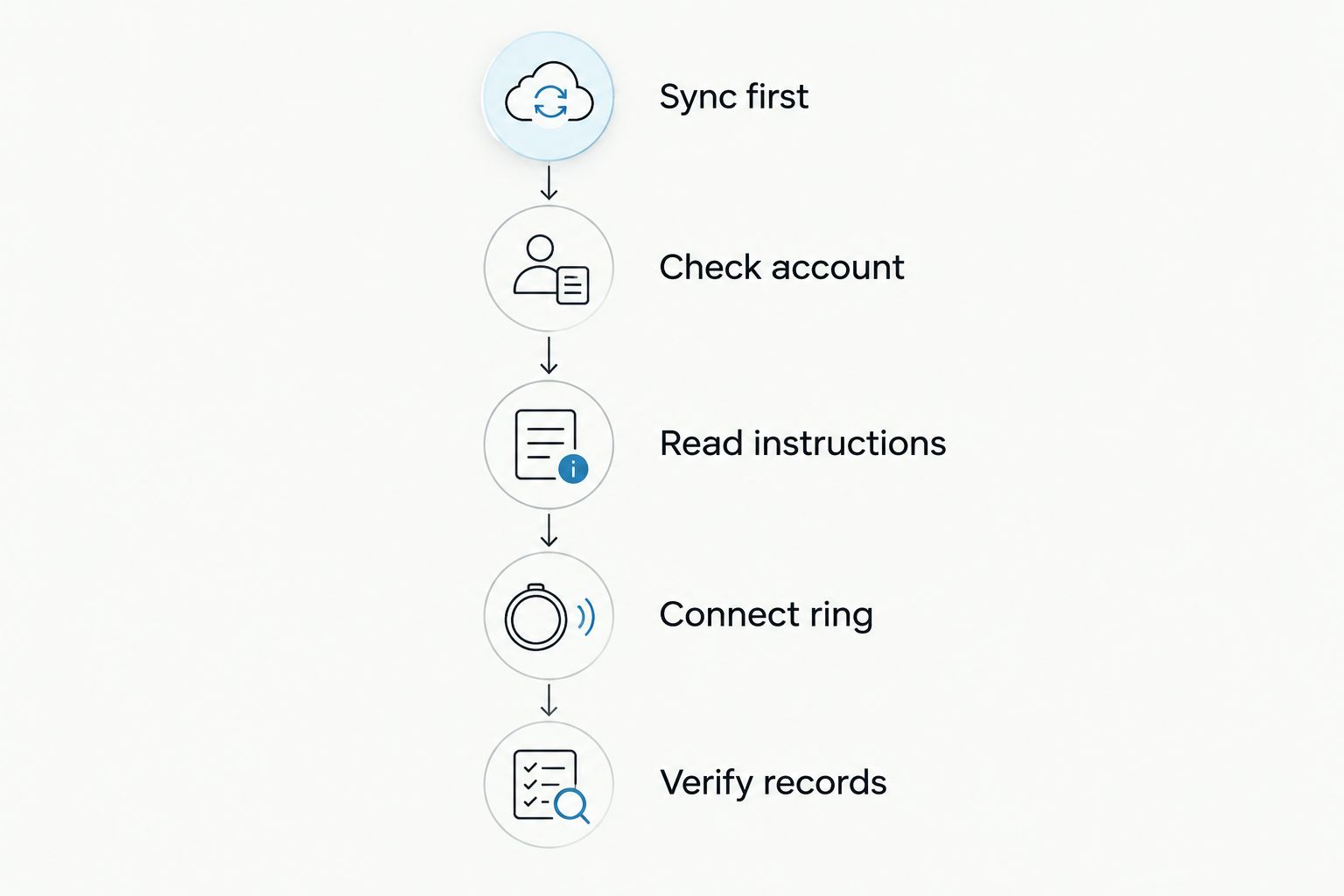
Sync first, check the transfer instructions, connect second, and verify before deleting anything. Use the following sequence as a preparation and verification checklist, not as a substitute for QRing’s current device-specific instructions.
1. Sync on the old phone before changing anything
Open the companion app on the old phone while the ring is nearby. Use the app’s normal sync process and check the latest visible sleep or activity record. Make a note of the last date you can see.
Do not assume that wearing the ring means every recent reading has reached the app. Check the records themselves before disconnecting the device.
2. Record the app and account details
Confirm that your existing app is QRing for the Odessa Smart Ring. Note the app’s identifying details from its store listing so you can recognize the correct listing on the new phone.
If you use an account, confirm the sign-in method and recovery access before starting. Do not create a fresh account simply because the new phone offers that option. First establish whether your existing records are associated with the account you already use.
3. Check the current transfer instructions
Look for the app’s instructions for changing phones, removing a device or reconnecting an existing ring. Read any warning about resetting, deleting data or removing an account before accepting it.
For your 2026 transfer, follow the labels and instructions in the installed app rather than an old screenshot. Do not treat Bluetooth removal, app unbinding and a factory reset as interchangeable actions.
4. Install the correct app on the new phone
Install QRing through the new phone’s official app store, matching the listing you checked on the old phone. Confirm that the listing supports your particular phone and operating-system version.
The Odessa Smart Ring supports iPhone and Android through QRing. That platform support does not mean every phone model or operating-system version has identical requirements.
5. Connect through the app’s instructed process
Keep the ring charged and nearby. Enable Bluetooth and review the permissions the phone requests for the companion app, then follow the app’s connection flow.
If the instructions require releasing the connection from the old phone, do that at the specified point. Avoid repeatedly switching between the phone’s Bluetooth settings and the app without checking which method the app requires.
6. Verify the new setup before clearing the old phone
Confirm that the new phone recognizes the ring and receives fresh information. Then inspect earlier sleep records separately, using the date you noted before the move.
Keep the old phone intact if historical records are missing or the connection remains unreliable. A successful connection is a milestone, not permission to assume every part of the transfer is finished.
What changes between iPhone and Android transfers?
The destination phone determines which app listing and permission settings you need to check. It does not establish whether your previous records will appear. Check that question separately before committing to a transfer.
| Transfer situation | Best for | Useful starting point | Limitation to check |
|---|---|---|---|
| iPhone to iPhone | Staying with iPhone | Compare the existing and destination app listings | A phone migration alone does not confirm ring reconnection or history access |
| Android to Android | Staying with Android | Check the destination phone’s app compatibility and permissions | Different phone settings require a fresh connection check |
| iPhone to Android, or Android to iPhone | Changing platforms | Confirm QRing support on the destination phone first | Cross-platform history access requires its own verification |
| Old phone unavailable | Replacing a lost or broken phone | Recover account access and consult device instructions | You cannot perform a final sync from the missing phone |
Staying on the same platform simplifies the compatibility question, but it is not a history-retention promise. Changing platforms adds another check: whether the account and records you use are accessible in the destination app.
For a 2026 switch between iPhone and Android, ask about historical data explicitly. “Does the app work on this phone?” and “Will my existing records appear?” are different questions.
Why the phone-transfer process varies
The safest transfer depends on the setup you already have. These factors determine which checks come first:
- Access to the old phone. A working old phone lets you sync, inspect records and confirm app details before disconnecting.
- Account access. If your setup uses an account, you need the correct sign-in method and access to any recovery channel.
- Destination-phone compatibility. Check the current QRing listing against your phone and operating-system version.
- Existing device connection. Follow the app’s instructions about releasing an old connection before establishing another.
- History requirements. If keeping earlier sleep records matters, resolve that requirement before resetting or deleting anything.
- Permission settings. Review Bluetooth and any other permissions requested by the installed app rather than assuming the old phone’s settings carried over.
These are setup checks, not reasons to buy a replacement ring. Changing phones should begin with compatibility and transfer guidance, not a new-device purchase.
 Screen-free · No subscriptionOdessa Smart RingShop the ring →
Will my sleep history move to the new phone?
Do not assume sleep history transfers just because the ring reconnects. Check how your current app setup handles records, then verify those records on the destination phone before erasing the original device.
If particular records matter to you, preserve a personal reference before making changes. Screenshots of visible summaries can help you compare what appears later, but they are not a restorable app backup.
Ask support a precise question: whether your existing records remain accessible after this particular phone change, using your current account arrangement. Avoid relying on a general answer about Bluetooth compatibility.
Do I need a subscription when I change phones?
The Odessa Smart Ring does not require a subscription, and its QRing companion app is free. A phone change does not turn that subscription-free product into a monthly plan.
No subscription describes the ownership model; it does not promise a particular backup or migration feature. For a 2026 purchase or phone upgrade, check those functions on their own merits rather than treating a fee structure as evidence of data portability.
Your ring and charging cable are included with the product. Establish that the existing setup works on the destination phone before considering optional accessories or another ring.
What if the ring will not connect to the new phone?
Check the connection basics before attempting a reset. Start with the correct app, a charged ring, Bluetooth enabled and the app permissions requested on the new phone.
Next, revisit the transfer instructions and confirm whether the old connection needs to be released. Do not delete your account or repeatedly reset the ring as a troubleshooting shortcut.
If the connection still fails, use Odessaring contact support. Include the old and new phone models, operating-system versions, app version, exact error message and whether you can still access the old phone. Say whether the issue is pairing, fresh readings, missing history or more than one of these.
What should you check after the move?
A good handoff ends with an ordinary-use check, not just a connected-device label. Confirm that the app receives fresh information, then review the next sleep record after wearing the ring normally.
Battery and charging
The client-confirmed battery specification is 5–7 days per charge. Start the transfer with enough charge to complete setup, and keep the included charging cable accessible while you check the connection.
A battery-life claim is not a data-storage claim. Do not use the charging interval to infer how much unsynced information the ring stores.
Fit and overnight comfort
The Odessa Smart Ring comes in US sizes 6–14. Changing phones does not change the ring’s fit, so continue checking that it feels comfortable during everyday and overnight wear.
Do not tighten your fit or tolerate discomfort to pursue a better-looking reading. If the fit is wrong, the client-confirmed terms include free size exchanges within 60 days.
Wellness-reading limits
Sleep, heart rate, stress, blood oxygen, skin temperature and activity readings are wellness estimates. They are not intended to diagnose, treat or monitor a medical condition.
A successful transfer does not establish measurement accuracy. Likewise, a different-looking result after changing phones is not, by itself, evidence of a health change; check the setup and seek appropriate medical advice for symptoms or health concerns.
Ownership terms
For this 2026 guide, the client-confirmed return promise is 60 days, with worn rings accepted; change-of-mind return postage is the customer’s responsibility. The published manufacturing-defect warranty is 12 months. Those terms do not establish that a connection issue requires a return.
Product specifications were checked October 25, 2026. Where older site wording differs on battery life or returns, the client-confirmed figures above take precedence.
Frequently asked questions
How do I set up a smart ring without subscription on a new phone?
Sync the ring on the old phone, confirm the companion app and account details, and follow the app’s current phone-transfer instructions. Verify both the new connection and access to previous records before erasing the old phone.
Can I use the Odessa Smart Ring with iPhone and Android?
The Odessa Smart Ring uses the free QRing app on iPhone and Android. Check the current app listing for your particular phone and operating-system version before switching.
Will Bluetooth pairing restore all my old sleep records?
Bluetooth pairing does not establish that previous sleep records have transferred. Check history access separately and keep the old phone until you have verified the records you need.
Should I factory-reset my smart ring before changing phones?
Do not factory-reset the ring as your first transfer step. Read the app’s current instructions and any data-loss warning before using a reset function.
What if I no longer have my old phone?
Start by recovering any existing account access and checking the app’s reconnection instructions. Ask support about pairing and historical records separately, since a final sync from the old phone is no longer possible.
Do I need to pay a monthly fee after moving the Odessa Smart Ring?
The Odessa Smart Ring requires no subscription and uses the free QRing app. Check compatibility and history access separately; subscription-free ownership is not a backup guarantee.
How long does the Odessa Smart Ring battery last?
The client-confirmed battery life is 5–7 days per charge. That specification describes charging frequency, not how long unsynced records remain stored.
One last thing
The easiest mistake is checking the ring and forgetting the records. Before trading in or wiping the old phone, open an earlier sleep entry on the new phone—not just the current connection screen.
That final check separates “the ring connects” from “the move meets your needs.” Odessaring’s subscription-free smart ring keeps monthly fees out of the decision; a careful handoff keeps the focus on the everyday insights you actually want to use.