Why is your sleep tracking ring missing a night's data?

A sleep tracking ring missing data needs two separate checks: whether the ring recorded the night and whether its app has received and displayed that record. For troubleshooting in 2026, start with charging, fit and the app connection before resetting anything; a blank sleep chart alone does not identify the cause or prove the recording is recoverable.
- Sleep tracking ring missing data: check recording and app synchronization separately before resetting your device.
- Odessaring provides subscription-free sleep insights through QRing; a missing night alone does not identify the fault.
- Keep screenshots and check charging, fit, phone permissions and the selected date before contacting support.
- Sleep and wellness readings are estimates, not measurements intended to diagnose, treat or monitor medical conditions.
Interactive · Metric explorer
Tap to explore what Odessa tracks

Sleep: how long and how well you slept, worked out from movement and heart rate overnight.
Heart rate: readings through the day and night from the optical sensor on the inside of the band.
HRV (heart rate variability): the variation between heartbeats, a signal many people watch for recovery trends.
SpO2: blood-oxygen estimates for general wellness, not medical use.
Stress: estimated from body signals such as HRV, so you can see calmer and busier stretches.
Skin temperature: changes against your own baseline over time.
Steps: steps, distance and calories, with sport modes for walking, running, cycling, swimming and more.
Cycle: log your cycle alongside the rest of your data to spot your own patterns.
What it doesn't do: it doesn't measure blood pressure, it doesn't detect snoring, and it doesn't diagnose, treat or prevent any condition. It's a wellness tracker, not a medical device.
Real product photo. Sensor positions are approximate. Battery: 5–7 days per charge. Free app, no subscription.
Why is your sleep tracking ring missing a night's data?
Your sleep chart sits at the end of a process: wearing the ring, recording signals, transferring information and displaying an estimated sleep record. A problem at any stage needs a different response. An empty chart is a symptom, not a diagnosis.
For the Odessa Smart Ring, the confirmed setup is a screen-free ring with the free QRing app for iPhone and Android. There is no subscription to renew as a troubleshooting step.
Use the following table to organize your checks. These are diagnostic questions, not confirmed explanations for a particular missing night.
| What you see | What to check first | What that check establishes |
|---|---|---|
| No sleep entry and no other recent readings | Charging and the app connection | Whether the issue extends beyond sleep |
| Other readings appear, but sleep is blank | Selected date and sleep display | Whether the gap is specific to the sleep record |
| The app does not show a connected ring | Bluetooth access and connection status | Whether the phone currently recognizes the ring |
| A partial night appears | Wear time, fit and interruptions | Whether the recording gap matches a known interruption |
| Daytime sleep seems absent | Dates around the sleep period | Whether the record appears under another day |
| Missing nights keep recurring | A dated log and support review | Whether the problem has a repeatable pattern |
Do not treat one row as proof that you have found the fault. For example, a connected ring confirms a connection now; it does not establish what happened overnight.
Why this matters
The wrong first move can remove useful troubleshooting evidence. A reset or app reinstall also changes the setup you are trying to investigate, making it harder to describe the original problem accurately.
A missing night can be frustrating without being medically meaningful. A blank sleep record does not show that you slept badly, stopped breathing or developed a health problem. Keep device troubleshooting separate from questions about your health.
A 2026 checklist for a missing sleep record
Work through these checks in order. Stop when the record appears or when the next step requires instructions specific to your device.
1. Check power
Connect the ring to its charging equipment and look for the charging indication described in its instructions. Do not assume that placing the ring on a charger confirms successful charging.
Odessaring's confirmed smart ring battery claim is 5–7 days per charge. That is a battery-life specification, not proof that the ring had enough charge for the missing night. Use the charge information shown for your own device rather than counting days alone.
If charging does not behave as expected, document that separately. A charging problem and a missing sleep chart belong in the same support request, but one does not automatically establish the cause of the other.
2. Check connection
Open the companion app near the ring and check its connection status. Confirm that Bluetooth is enabled and that the app has the phone permissions requested for connecting to nearby devices.
On an iPhone or Android phone, use the operating system's app settings to review permissions. Menu wording varies, so follow the labels on your phone rather than instructions written for a different version.
Keep the app open while checking for updated information. Avoid repeatedly unpairing the ring: changing the pairing adds another variable before you know whether the current connection works.
3. Check dates
Look at the night you expect to see, then inspect the neighboring dates. This is especially useful when your sleep crosses midnight, follows travel or happens during the day.
Review the phone's date and time settings as well. This check does not establish how QRing assigns sleep to a date; it helps you describe exactly where you searched and whether your phone's time changed.
Do not assume a blank calendar square means every record from that sleep period is absent. Check the available sleep detail screens before deciding what is missing.
4. Check wear
Think back to when you put the ring on, whether you removed it and whether it felt secure. Note any obvious gaps rather than trying to reconstruct the night from memory later.
Check that the ring sits comfortably without spinning freely or feeling painfully tight. Follow the manufacturer's wearing instructions; do not invent a sensor orientation or switch fingers on the assumption that every ring works the same way.
Fit checks help identify a possible recording interruption. They do not prove that fit caused the missing night or guarantee that changing fit will restore it.
5. Save evidence
Capture the blank sleep screen, the selected date, connection status and any error message. Record your phone model, operating system version and app version.
Then use the manufacturer's troubleshooting instructions or contact support. Do not reset the ring or delete the app until you understand the effect on existing records. Whether a missing night can return depends on whether a usable record still exists and can be transferred or displayed.
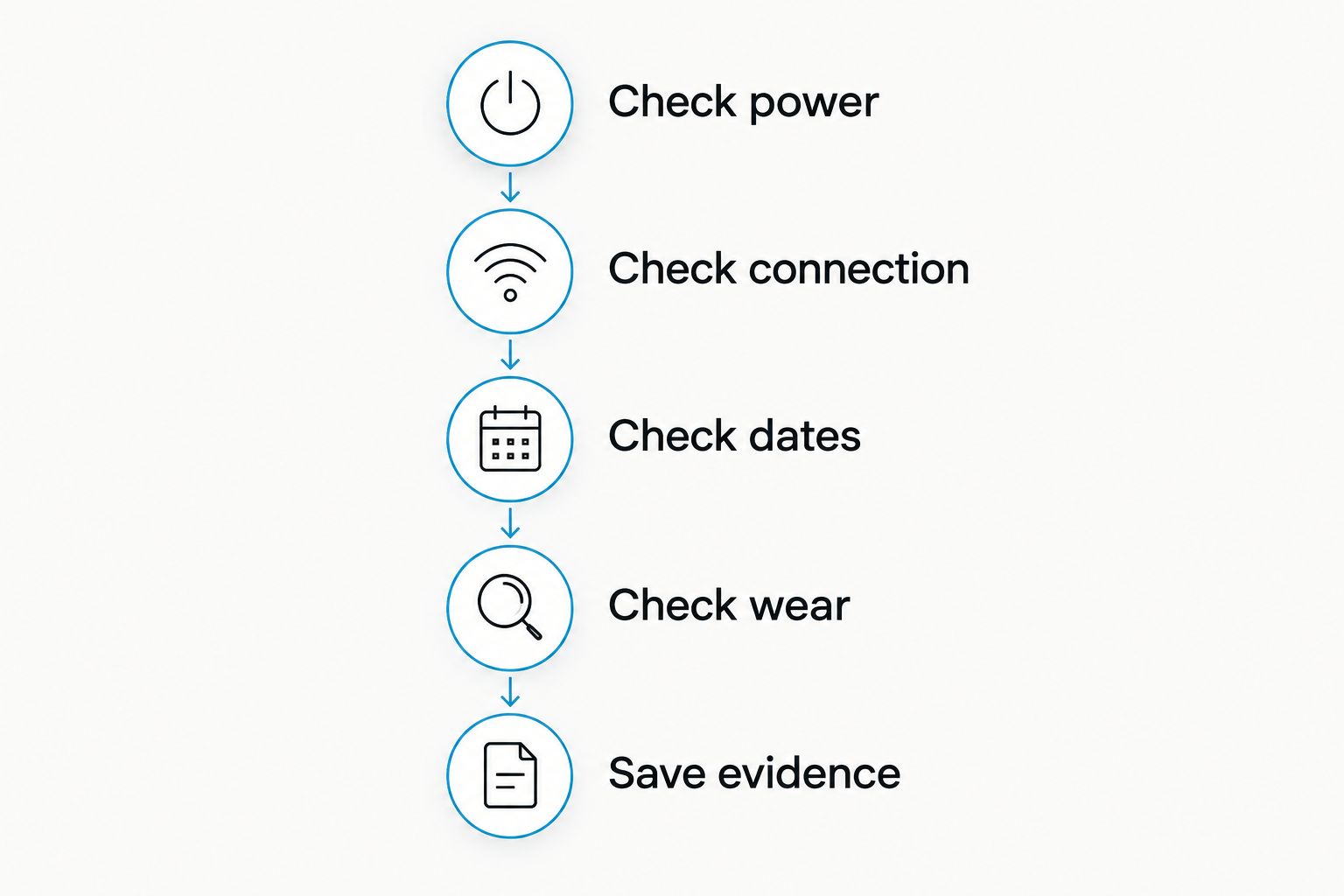
The checklist separates simple observations from conclusions. You do not need to know the cause before asking for help; a clear record of what you see is more useful than a confident guess.
Why missing sleep data needs different checks
The location of the gap changes what to investigate. These five factors help you narrow the question without claiming access to the ring's internal recording process.
- Power: A battery-life claim describes expected use, not the charge remaining on a particular night. Check actual charging behavior.
- Connection: An app that cannot currently connect needs a connection check before you interpret its blank charts.
- Wear and fit: A known period off your finger gives support a concrete interruption to investigate. Comfort also matters for consistent overnight wear.
- Date selection: Overnight sleep, daytime sleep and travel make the dates you inspected relevant to the support request.
- Display versus recording: A missing chart does not tell you whether information was never recorded, has not transferred or is not being displayed.
Avoid adding unsupported explanations such as a required minimum sleep duration, a fixed synchronization deadline or a special subscription setting. Those details need device-specific documentation.
 Screen-free · No subscriptionOdessa Smart RingShop the ring →
Is the whole night missing, or just part of the sleep report?
Separate an absent sleep session from a sleep session with incomplete detail. They are different descriptions of the problem, even if both leave you disappointed with the chart.
If a sleep session appears, note which fields are present and which are absent. If the whole session is missing, record whether other readings appear during the same period. Do not infer an app's processing rules from the layout alone.
This distinction also prevents an accuracy question from being mistaken for a missing-data question. A displayed sleep estimate that differs from your recollection needs a different discussion from a night with no entry at all.
For any sleep tracking ring, estimated sleep information is not a direct medical measurement. Odessaring's wellness readings are estimates and are not intended to diagnose, treat or monitor medical conditions.
Can you recover a missing night of sleep data?
Recovery depends on whether a usable record still exists. If information remains on the device or in its data system but has not appeared in the app, support can advise on the appropriate next step; a chart cannot recreate signals that were never recorded.
Do not accept a universal promise that opening the app, reinstalling it or waiting will restore every missing night. None of those actions establishes that an overnight record exists.
Before making a destructive change, ask support whether the proposed step affects stored information. Get instructions for your ring and app rather than borrowing a reset procedure from another brand.
Should you reset a sleep tracking ring when data is missing?
A reset is not the first step for a missing sleep record. Start with charging, connection, date selection and screenshots, then follow device-specific instructions.
A reset changes the device state. Without clear instructions about retained records, it introduces uncertainty instead of resolving the original question.
The same caution applies to deleting the app or removing the pairing. Ask what each action is intended to test and what information you should save first.
What should you send support if missing nights keep happening?
Send a short, factual report with the affected dates and the checks you completed. Use the contact page to ask for the next device-specific step rather than starting with a request for an unexplained reset.
Include:
- The dates of missing or partial sleep records.
- Whether other readings appear during those periods.
- Your phone model, operating system and QRing version.
- Whether the app currently shows a connection.
- What happened when you connected the charger.
- Whether you removed the ring or changed phones.
- Screenshots of the relevant screens and error messages.
Keep observations separate from theories. Saying that the app shows no sleep entry for a particular date gives support something to inspect; saying that a sensor has failed claims a cause you have not established.
Keep troubleshooting separate from return decisions
The product fact sheet checked October 25, 2026, records the client-confirmed 60-day return promise, with worn rings accepted, and a 12-month manufacturing-defect warranty. Change-of-mind return postage is the customer's responsibility; free size exchanges are offered within 60 days.
Some site wording conflicts with the confirmed return promise. Ask support to clarify the applicable terms in writing rather than treating inconsistent wording as interchangeable. Neither a return window nor a warranty establishes why a sleep record is missing.
Frequently asked questions
Why is my sleep tracking ring missing data in 2026?
A blank sleep chart does not identify the cause: check charging, the app connection, date selection and overnight wear first. Separate a missing recording from information that has not transferred or appeared in the app.
Does a missing sleep record mean my ring battery died?
No. A missing sleep record alone does not prove the battery died. Check charging behavior and whether other readings are present before drawing that conclusion.
Will opening QRing bring back last night's sleep?
Opening QRing is a useful connection check, not a guarantee of recovery. Whether the night can appear depends on whether a usable record exists and can be transferred or displayed.
Should I delete the app to fix a missing night?
Do not delete the app as your first troubleshooting step. Save screenshots and ask support whether reinstalling affects existing information before proceeding.
Can a loose smart ring explain missing sleep data?
Fit is worth checking, but a blank chart does not prove that a loose ring caused the problem. Review whether the ring stayed comfortably in place and follow its wearing instructions.
Do I need a subscription to see my Odessa Smart Ring sleep data?
No subscription is required for the Odessa Smart Ring's free QRing app on iPhone and Android. Subscription renewal is not a troubleshooting step for a missing night.
Does missing sleep data mean I have sleep apnea?
No. Missing sleep data does not diagnose sleep apnea or any other condition. Wellness estimates are not intended to diagnose, treat or monitor medical conditions; discuss health concerns with a qualified clinician.
What is the confirmed battery life for the ring?
The confirmed battery claim is 5–7 days per charge. That specification does not establish how much charge remained during a particular missing night.
One last thing
For women seeking subscription-free everyday sleep insights, Odessaring is best suited to wellness tracking, not medical monitoring. The practical benefit is a screen-free way to review estimates, not a guarantee that every night will produce a complete record.
For your 2026 troubleshooting log, record how you remember sleeping alongside the missing date. That note will not reconstruct sensor data, but it preserves useful context without turning an empty chart into a judgment about your sleep.